Ardianic
English

Pausecheck

Scam checker app

A second look before you reply, pay or tap.

A text says your parcel is stuck. An email says your account is locked. A shop has 90% off and only takes bank transfer. Share it to Pausecheck, or paste it in, and it shows the warning signs it finds, quoted from the message, and the one thing to do first. It runs on your phone: no account, and nothing you check is sent or kept.

  • Free checks, no ads
  • iPhone and iPad
  • No account
  • Runs on your phone
  • For the whole family
  • English · Tiếng Việt · 简体中文
Coming soon to the App Store How it works
How it works

Share it, read the signs, do one thing

  1. Share or paste itIn Messages, WhatsApp, Mail or Safari, press Share and pick Pausecheck. Or copy it and tap Paste and check. For a letter or a QR sticker, take a photo.
  2. See the warning signsEach sign is quoted from the message and highlighted, with one line on why scammers use it.
  3. Do this firstOne clear step, such as "call your bank on the number on your card", and whose advice it is.
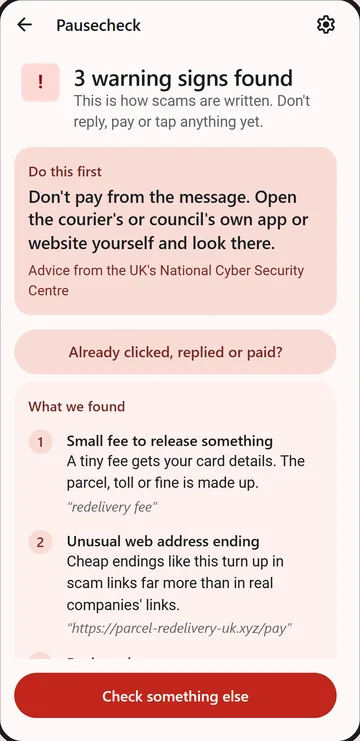
Example result 3 warning signs found

Your parcel could not be delivered due to an unpaid redelivery fee of £1.45. Pay within 24h or it will be returned: parcel-redelivery-uk.xyz

  • Small fee to release something
  • Rush or threat
  • Unusual web address ending

Do this first: don't pay from the message. Open the courier's own app or website yourself and look there.

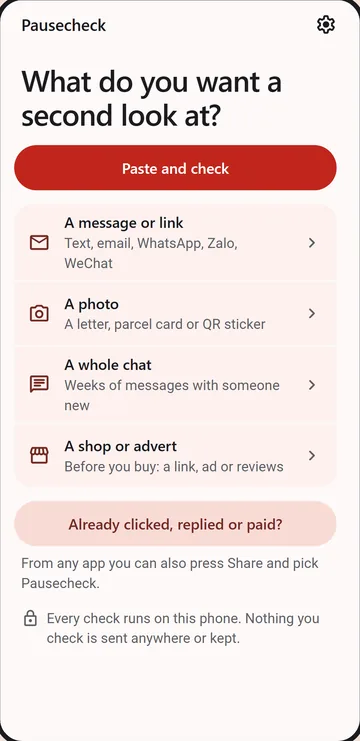
  • Pausecheck on a phone: What do you want a second look at? Paste and check, then a message or link, a photo, a whole chat, or a shop or advert.
  • Pausecheck on a phone: a parcel text gets 3 warning signs found, with Do this first: don't pay from the message.
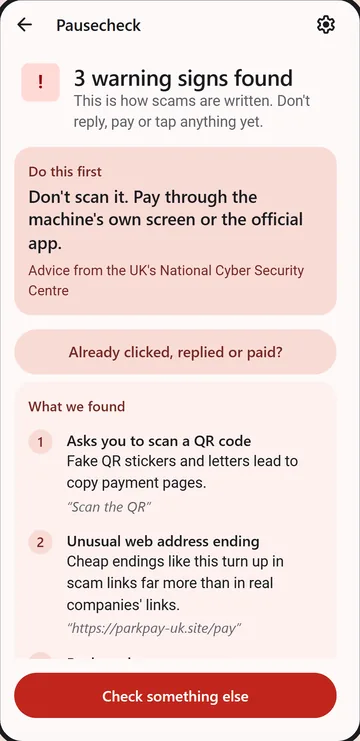
  • Pausecheck on a phone: a photo of a parking QR sticker, with Don't scan it. Pay through the machine's own screen.
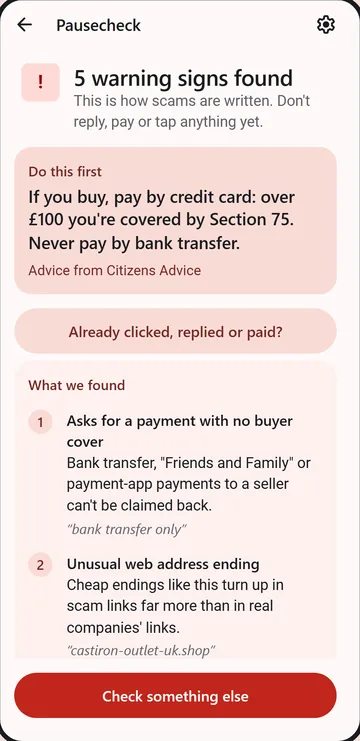
  • Pausecheck on a phone: a shop advert gets 5 warning signs found, with If you buy, pay by credit card. Never by bank transfer.
What it checks

Texts, links, letters, chats and shops

  • A message or link. Texts, WhatsApp, emails and chat messages: requests for codes, "safe account" transfers, gift cards, "Hi Mum, new number", fines and fees, prizes and refunds.
  • The sender and the link. Look-alike web addresses and email senders, a company writing from Gmail, shortened links (tap Where does it go? to follow one without opening it), app files from links, costly phone numbers, and a list of about 390,000 known scam sites kept on the phone.
  • A photo. A letter, a parcel card, a parking-meter QR sticker or a screen. The words are read on the phone, and a QR code's real address is shown and checked.
  • A whole chat. Romance and investment scams take weeks. Paste the chat and see how the story built up, step by step, with dates.
  • A shop or advert. Before you buy: huge discounts, "only 3 left", no returns, no address, copied returns policies, and reviews that look bought. Every shop result ends with how to pay with buyer cover.
  • Already clicked, replied or paid? Five steps in order: your bank, your passwords, removing an app, reporting it, and watching for "we can get your money back" offers.
Private by design

What you check stays on your phone

  • Every check runs on your phone. Messages, photos and chats are never sent anywhere and are forgotten when you leave the result.
  • No account, no sign-in, no ads, no tracking. We don't run a server for it.
  • Two look-ups are optional. How old is this website? sends only the web address, straight from your phone to the public web address register, and reads the shop's own pages. Where does this link go?, for short links and QR codes, asks each step of the link where it leads without opening the page, so the link itself is sent. Nothing else you pasted goes with them. You tap them each time; they never run by themselves.
  • .uk web addresses aren't looked up, because the .uk register's terms don't allow this kind of use. The app says so.
Honest results

It never says "safe"

  • A result is one of three: warning signs found, a few signs worth checking, or no warning signs we know. There is no score and no "genuine" stamp.
  • Finding nothing doesn't prove a message is genuine. New tricks appear every week, so every result, even an empty one, still comes with one step to take.
  • It can miss a scam. When money, a code or an app is involved, check with the person or company using a number or website you find yourself.
  • On iPhones with Apple Intelligence, Apple's own on-device model can add a plain-words note. It can only add signs it quotes from the message; it can never clear one.
  • Each step follows advice from public bodies, such as Take Five, the UK's National Cyber Security Centre, the US Federal Trade Commission, and Vietnam's and China's Ministries of Public Security, and names its source.
For families

Put it on your parents' phone

  • Built for older relatives too: one button per job, large text, and every result can be sent to someone you trust.
  • Send this to someone you trust copies the result in a line, so your dad can ask you before he pays.
  • Set it up together once: show them Share, then Pausecheck. After that a check takes a few seconds.
  • Pick where you live (UK, US, Vietnam, China or elsewhere) and the "Report it" buttons go to that country's official channels, like 7726 in the UK or 156 in Vietnam.
  • One Family unlock covers you and up to 5 family members through Family Sharing.
Free

What's free, and the one thing you can buy

  • Free, with no limit: message, link, email and photo checks, and the "already paid" steps.
  • Shop checks: 3 free a day. Trying an example doesn't count.
  • Chat checks: your first one is free.
  • Family unlock, £3.99 once: unlimited shop checks and chat checks for you and up to 5 family members (Family Sharing). No subscription and no trial.
Questions

Common questions

How do I check if a text is a scam?

Don't tap the link. Press and hold the message, copy it, then open Pausecheck and tap Paste and check. Or press Share in the app it came in and pick Pausecheck. You'll see the warning signs it found and one step to take first.

Can it tell me a message is safe?

No, and no app honestly can. Pausecheck names the warning signs it knows. If it finds none, it says so, and reminds you that this doesn't prove the message is genuine.

Does Pausecheck read my messages or upload them?

No. It sees only what you share or paste into it, checks it on your phone, and forgets it when you leave the result. Apple doesn't let any app read your other messages, and Pausecheck doesn't try.

How do I check if an online shop is legit?

Paste the shop's link, its advert, or a few of its reviews into "A shop or advert". Pausecheck looks for the signs fake shops share, and can look up how old the website is if you ask. It then shows how to pay with buyer cover.

Can it check a QR code or a letter?

Yes. Take a photo of it. The words and the QR code are read on your phone, and you see where the QR code really goes before you open it.

I've already paid. What now?

Call your bank straight away on the number on your card. Pausecheck's "Already clicked, replied or paid?" screen gives the next steps, in order, for your country.

Which phones and languages?

iPhone and iPad first, in English, Vietnamese and Simplified Chinese. An Android version is planned.

Help and contact

Restoring the unlock, the daily shop checks, or a result that looks wrong? The help page explains. If you write to us about a result, leave out names, numbers and bank details.